Page tree

Versions Compared

Key

  • This line was added.
  • This line was removed.
  • Formatting was changed.
Comment: Published by Scroll Versions from space COLORFLOW and version 11.5
Sv translation
languageen

Ink savings can first be maximized with the following settings in the Ink Optimizing Solution DeviceLink Definition:

  1. Set Black Start to 0. This ensures that Black ink will be used instead of CMY to produce the gray component of colors.
  2. Set Max Black to 100. This ensures that as much Black as possible can be used.
  3. Set Black Strength to 100. This ensures that the Black ink will replace CMY ink to the maximum extent possible. Ideally, Black should be increased, replacing CMY, until at least one of Cyan, Magenta and Yellow approaches zero, or Black approaches 100%. Ink Optimizing Solution improvements in ColorFlow 11.0.2 maximize this effect.

For further ink savings, use the Limit Dark Point Total Ink feature. This reduces ink consumption by slightly lightening dark colors, while preserving detail.

  1. Select Limit Dark Point Total Ink to:
  2. Reduce the associated Total Ink value. Lower values will increase ink savings, at the expense of less output dynamic range.

Kodak recommends an initial value of about two-thirds the value in the Total Ink Limit: field. You can assess the ink savings, as described in Verifying your ink savings, and gauge the effect on image quality by comparing refined or output PDF files in a PDF viewer.

Example:  Ink Optimizing Solution DeviceLinks for reseparating FOGRA 40 content.

  1. FOGRA 40 ICC device profiles have a typical Total Ink Limit of 270. To maintain the chroma extent of images, set the Ink Optimizing DeviceLink Total Ink Limit to 270.
  2. Select Rendering Intent: Perceptual to ensure highest quality image rendering.
  3. Set Black Start to 0, Max Black to 100 and Black Strength to 100 as above.
  4. Select Limit Dark Point Total Ink to: and enter Total Ink value 180 (two-thirds of 270).
  5. Click OK.

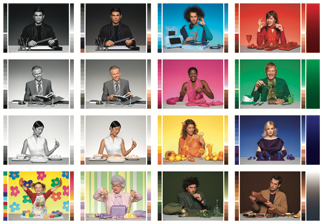
Ink savings are analysed using the test form shown below, separated with a FOGRA 40 device profile and then reseparated with each of two Ink Optimizing Solution DeviceLinks, the last one using Limit Dark Point Total Ink feature.

Image Modified


Test Case

Total Ink Limit

Dark Point Total Ink Limit

Dark Point L*Substrate L*

Average CMYK

Average Total ink

Original FOGRA 40 Separation270270158927, 30, 34, 18109
Ink Op Reseparation270270158914, 19, 23, 2884

Ink Op Reseparation with Dark Point Total Ink Limit

270

180

18.5

89

13, 18, 22, 28

81

The first Ink Op DeviceLink reduces ink consumption by 23%; the second reduces it by 26%. Note that half of the images in this test form are highly chromatic, limiting the opportunity to replace CMY inks with Black. Less chromatic content will yield lower total ink and higher ink savings.


Sv translation
languagezh

首先可以通过墨水优化解决方案 DeviceLink 定义中的以下设置来最大程度地节省墨水:

  1. 将“黑色开始”设置为 0。这确保使用黑色墨水而不是 CMY 来产生颜色的灰色成分。
  2. 将“最大黑色”设置为 100。这确保可以使用尽可能多的黑色。
  3. 将黑色强度设置为 100。这可确保黑色墨水将最大程度地替代 CMY 墨水。理想情况下,应增加黑色,替代 CMY,直到青色、洋红色和黄色中至少有一个接近零,或黑色接近 100%。ColorFlow 11.0.2 中的墨水优化解决方案改进可最大程度地发挥这一效果。

为了进一步节省墨水,请使用“限制暗点总墨水量”功能。此功能通过略微淡化深色来减少墨水消耗,同时保留细节。

  1. 选择将暗点总墨水限制为:
  2. 降低相关的“总墨水量”值。较低的值将增加墨水节省量,但代价是输出动态范围较小。

柯达建议初始值约为“总墨水限制: ”字段中值的三分之二。您可以评估墨水节省情况(如验证墨水节省情况中所述),并通过在 PDF 查看器中比较精炼或输出 PDF 文件来衡量对图像质量的影响。

示例:  墨水优化解决方案 DeviceLinks 用于重新分离 FOGRA 40 内容。

  1. FOGRA 40 ICC 设备配置文件的典型总墨水限制为 270。要保持图像的色度范围,请将墨水优化 DeviceLink 总墨水限制设置为 270。
  2. 选择 渲染意图: 感知以确保最高质量的图像渲染。
  3. 如上所述,将黑色开始设置 为 0、最大黑色设置为 100 并将黑色强度设置为 100。 
  4. 选择将暗点总墨水量限制为: 并输入总墨水量值 180(270 的三分之二)。
  5. 单击 “确定”

使用下面显示的测试表格来分析墨水节省情况,用 FOGRA 40 设备配置文件分离,然后用两个墨水优化解决方案 DeviceLinks 中的每一个重新分离,最后一个使用 限制暗点总墨水 功能。

Image Added


测试案例 

总墨水限制

暗点总墨水限制

暗点 L*

底物 L

平均 CMYK

平均总墨水量

原装 FOGRA 40 分离270270158927, 30, 34, 18109
油墨操作再分离270270158914, 19, 23, 2884

使用暗点总墨水限制进行油墨操作再分离

270

180

18.5

89

13, 18, 22, 28

81

第一个 Ink Op DeviceLink 可将墨水消耗量减少 23%;第二个可将其减少 26%。请注意,此测试表单中的一半图像色彩鲜艳,限制了用黑色墨水替换 CMY 墨水的机会。色彩含量越少,墨水总量就越低,墨水节省量也就越大。

Sv translation
languagefr

Les économies d'encre peuvent d'abord être maximisées avec les paramètres suivants dans la définition DeviceLink de la solution d'optimisation de l'encre :

  1. Définissez le paramètre Black Start sur 0. Cela garantit que l'encre noire sera utilisée à la place de CMJ pour produire la composante grise des couleurs.
  2. Réglez Max Black sur 100. Cela garantit qu'autant de noir que possible peut être utilisé.
  3. Définissez l'intensité du noir sur 100. Cela garantit que l'encre noire remplacera l'encre CMJ dans toute la mesure du possible. Idéalement, le noir devrait être augmenté, en remplacement de l'encre CMJ, jusqu'à ce qu'au moins l'une des couleurs cyan, magenta et jaune approche de zéro, ou que le noir approche de 100 %. Les améliorations apportées à la solution d'optimisation de l'encre dans ColorFlow 11.0.2 maximisent cet effet.

Pour économiser davantage d'encre, utilisez la fonction Limit Dark Point Total Ink . Cette fonction réduit la consommation d'encre en éclaircissant légèrement les couleurs sombres, tout en préservant les détails.

  1. Sélectionnez Limiter le total d'encre du point sombre à :
  2. Réduisez la valeur d'encre totale associée. Des valeurs inférieures augmenteront les économies d'encre, au détriment d'une plage dynamique de sortie plus faible.

Kodak recommande une valeur initiale d'environ deux tiers de la valeur du champ Limite totale d'encre : Vous pouvez évaluer les économies d'encre, comme décrit dans Vérification de vos économies d'encre , et évaluer l'effet sur la qualité de l'image en comparant les fichiers PDF raffinés ou de sortie dans une visionneuse PDF.

Exemple :  Solution d'optimisation d'encre DeviceLinks pour reséparer le contenu FOGRA 40.

  1. Les profils de périphérique ICC FOGRA 40 ont une limite d'encre totale typique de 270. Pour conserver l'étendue de la chrominance des images, définissez la  limite d'encre totale du DeviceLink d'optimisation de l'encre sur 270.
  2. Sélectionnez  Intention de rendu :  Perceptuel pour garantir un rendu d’image de la plus haute qualité.
  3. Réglez  le démarrage du noir sur 0, le noir maximum sur 100 et la force du noir sur 100 comme ci-dessus. 
  4. Sélectionnez Limiter le total d'encre du point sombre à :  et entrez la valeur totale d'encre 180 (deux tiers de 270).
  5. Cliquez sur  OK .

Les économies d'encre sont analysées à l'aide du formulaire de test ci-dessous, séparées par un profil d'appareil FOGRA 40, puis reséparées avec chacun des deux DeviceLinks de solution d'optimisation d'encre, le dernier utilisant  la fonction Limit Dark Point Total Ink  .

Image Added


Cas de test

Limite totale d'encre

Limite totale d'encre Dark Point

Point sombre L*

Substrat L*

CMJN moyen

Encre totale moyenne

Séparation originale FOGRA 40270270158927, 30, 34, 18109
Séparation des encres270270158914, 19, 23, 2884

Reséparation de l'encre avec limite totale d'encre à point sombre

270

180

18,5

89

13, 18, 22, 28

81

Le premier Ink Op DeviceLink réduit la consommation d'encre de 23 % ; le second la réduit de 26 %. Notez que la moitié des images de ce test sont très chromatiques, ce qui limite la possibilité de remplacer les encres CMJ par du noir. Un contenu chromatique moindre produira une consommation totale d'encre inférieure et des économies d'encre plus importantes.

Sv translation
languagede

Die Tinteneinsparungen können zunächst mit den folgenden Einstellungen in der DeviceLink-Definition der Ink Optimizing Solution maximiert werden:

  1. Setzen Sie „Schwarzstart“ auf 0. Dadurch wird sichergestellt, dass zur Erzeugung der Graukomponente von Farben schwarze Tinte statt CMY verwendet wird.
  2. Stellen Sie Max Black auf 100 ein. Dadurch wird sichergestellt, dass so viel Schwarz wie möglich verwendet werden kann.
  3. Stellen Sie die Schwarzstärke auf 100 ein. Dadurch wird sichergestellt, dass die schwarze Tinte die CMY-Tinte so weit wie möglich ersetzt. Idealerweise sollte Schwarz erhöht werden und CMY ersetzen, bis mindestens einer der Werte Cyan, Magenta und Gelb Null erreicht oder Schwarz 100 % erreicht. Verbesserungen der Tintenoptimierungslösung in ColorFlow 11.0.2 maximieren diesen Effekt.

Um noch mehr Tinte zu sparen, verwenden Sie die Funktion „Gesamttinte für dunkle Punkte begrenzen“ . Dadurch wird der Tintenverbrauch durch leichtes Aufhellen dunkler Farben verringert, während Details erhalten bleiben.

  1. Wählen Sie „Gesamttinte für dunkle Punkte begrenzen“ auf:
  2. Reduzieren Sie den zugehörigen Gesamttintenwert. Niedrigere Werte erhöhen die Tinteneinsparungen, allerdings auf Kosten eines geringeren Ausgabedynamikbereichs.

Kodak empfiehlt einen Anfangswert von etwa zwei Dritteln des Wertes im Feld „ Gesamttintenlimit: “. Sie können die Tinteneinsparungen wie unter „ Überprüfen Ihrer Tinteneinsparungen “ beschrieben beurteilen und die Auswirkung auf die Bildqualität abschätzen, indem Sie verfeinerte oder ausgegebene PDF-Dateien in einem PDF-Viewer vergleichen.

Beispiel:  Ink Optimizing Solution DeviceLinks zum erneuten Trennen von FOGRA 40-Inhalten.

  1. FOGRA 40 ICC-Geräteprofile haben ein typisches Gesamttintenlimit von 270. Um den Chroma-Ausmaß der Bilder beizubehalten, setzen Sie das  Gesamttintenlimit von Ink Optimizing DeviceLink auf 270.
  2. Wählen Sie  „Rendering-Intent:  Perceptual“, um eine Bildwiedergabe in höchster Qualität sicherzustellen.
  3. Setzen Sie  „Start Schwarz“ auf 0, „Max. Schwarz“ auf 100 und „Schwarzstärke“ auf 100 wie oben. 
  4. Wählen Sie „Gesamttinte für dunklen Punkt begrenzen auf:“  und geben Sie den Gesamttintenwert 180 (zwei Drittel von 270) ein.
  5. Klicken Sie auf  OK .

Die Tinteneinsparungen werden mithilfe des unten gezeigten Testformulars analysiert, mit einem FOGRA 40-Geräteprofil getrennt und dann mit jedem der beiden DeviceLinks der Ink Optimizing Solution erneut getrennt, wobei beim letzten die  Funktion „Limit Dark Point Total Ink“  verwendet wird .

Image Added


Testfall

Gesamttintenlimit

Dark Point Gesamttintenlimit

Dunkelpunkt L*

Substrat L*

Durchschnittlicher CMYK

Durchschnittliche Gesamttinte

Original FOGRA 40 Separation270270158927, 30, 34, 18109
Tinten-Op-Neutrennung270270158914, 19, 23, 2884

Tinten-Op-Reseparation mit Dark Point Total Ink Limit

270

180

18,5

89

13, 18, 22, 28

81

Der erste Ink Op DeviceLink reduziert den Tintenverbrauch um 23 %, der zweite um 26 %. Beachten Sie, dass die Hälfte der Bilder in diesem Testformular stark chromatisch ist, was die Möglichkeit einschränkt, CMY-Tinten durch Schwarz zu ersetzen. Ein geringerer chromatischer Inhalt führt zu weniger Gesamttinte und höheren Tinteneinsparungen.

Sv translation
languageit

Il risparmio di inchiostro può essere massimizzato innanzitutto con le seguenti impostazioni nella definizione DeviceLink della soluzione di ottimizzazione dell'inchiostro:

  1. Impostare Black Start su 0. In questo modo si garantisce che per produrre la componente grigia dei colori verrà utilizzato l'inchiostro nero anziché CMY.
  2. Imposta Max Black su 100. In questo modo si garantisce che venga utilizzato il più possibile il Black.
  3. Imposta Black Strength su 100. Ciò assicura che l'inchiostro nero sostituisca l'inchiostro CMY nella misura massima possibile. Idealmente, il nero dovrebbe essere aumentato, sostituendo CMY, finché almeno uno tra ciano, magenta e giallo non si avvicina a zero, o il nero non si avvicina al 100%. I miglioramenti della soluzione di ottimizzazione dell'inchiostro in ColorFlow 11.0.2 massimizzano questo effetto.

Per ulteriori risparmi di inchiostro, usa la funzione Limit Dark Point Total Ink . Questa riduce il consumo di inchiostro schiarendo leggermente i colori scuri, preservando al contempo i dettagli.

  1. Seleziona Limita inchiostro totale punto scuro a:
  2. Ridurre il valore Total Ink associato. Valori più bassi aumenteranno il risparmio di inchiostro, a scapito di una gamma dinamica di output inferiore.

Kodak consiglia un valore iniziale di circa due terzi del valore nel campo Limite inchiostro totale:. È possibile valutare il risparmio di inchiostro, come descritto in Verifica del risparmio di inchiostro , e valutare l'effetto sulla qualità dell'immagine confrontando file PDF raffinati o di output in un visualizzatore PDF.

Esempio:  DeviceLinks della soluzione di ottimizzazione dell'inchiostro per la nuova separazione del contenuto FOGRA 40.

  1. I profili dei dispositivi FOGRA 40 ICC hanno un limite di inchiostro totale tipico di 270. Per mantenere l'estensione cromatica delle immagini, impostare il  limite di inchiostro totale di Ink Optimizing DeviceLink su 270.
  2. Selezionare  Intento di rendering:  Percettivo per garantire la massima qualità di rendering delle immagini.
  3. Impostare  Black Start su 0, Max Black su 100 e Black Strength su 100 come sopra. 
  4. Selezionare Limita inchiostro totale punto scuro a:  e immettere il valore inchiostro totale 180 (due terzi di 270).
  5. Fare clic su  OK .

I risparmi di inchiostro vengono analizzati utilizzando il modulo di test mostrato di seguito, separato con un profilo dispositivo FOGRA 40 e quindi nuovamente separato con ciascuno dei due DeviceLink di Ink Optimizing Solution, l'ultimo utilizzando la funzione Limit Dark Point Total Ink  .

Image Added


Caso di prova

Limite totale di inchiostro

Limite totale inchiostro punto scuro

Punto scuro L* 

Substrato L* 

CMYK medio

Inchiostro totale medio

Separazione originale FOGRA 40270270158927, 30, 34, 18109
Riseparazione dell'inchiostro270270158914, 19, 23, 2884

Riseparazione dell'inchiostro con punto scuro Limite totale dell'inchiostro

270

180

18.5

89

13, 18, 22, 28

81

Il primo Ink Op DeviceLink riduce il consumo di inchiostro del 23%; il secondo lo riduce del 26%. Si noti che metà delle immagini in questo modulo di prova sono altamente cromatiche, limitando l'opportunità di sostituire gli inchiostri CMY con il nero. Un contenuto cromatico inferiore produrrà un inchiostro totale inferiore e un maggiore risparmio di inchiostro.

Sv translation
languageja

インクの節約は、まずインク最適化ソリューションの DeviceLink 定義で次の設定を行うことで最大化できます。

  1. Black Startを 0 に設定します。これにより、CMY の代わりに黒インクが使用され、色のグレー コンポーネントが生成されます。
  2. Max Black を100 に設定します。これにより、可能な限り多くの黒を使用できるようになります。
  3. ブラックの強度を 100 に設定します。これにより、ブラック インクが CMY インクを可能な限り最大限に置き換えます。理想的には、シアン、マゼンタ、イエローの少なくとも 1 つがゼロに近づくか、ブラックが 100% に近づくまで、ブラックを増加して CMY を置き換えます。ColorFlow 11.0.2 のインク最適化ソリューションの改善により、この効果が最大限に高まります。

さらにインクを節約するには、「暗点総インク制限」機能を使用します。これにより、細部を維持しながら暗い色をわずかに明るくすることで、インクの消費量が削減されます。

  1. ダークポイントの合計インクを制限するには、以下を選択します。
  2. 関連する合計インク値を減らします。値が低いほどインクの節約量は増えますが、出力のダイナミック レンジは狭くなります。

Kodak では、初期値として[Total Ink Limit: ] フィールドの値の約 3 分の 2 を推奨しています。インク節約の確認で説明されているように、インク節約を評価し、PDF ビューアで調整済みまたは出力された PDF ファイルを比較して、画像品質への影響を測定できます。

例:  FOGRA 40 コンテンツを再分離するためのインク最適化ソリューション DeviceLinks。

  1. FOGRA 40 ICC デバイス プロファイルの一般的な総インク制限は 270 です。画像の彩度範囲を維持するには、インク最適化 DeviceLink の 総インク制限を 270 に設定します。
  2. 最高品質の画像レンダリングを確保するには、 「レンダリング インテント: 知覚」を選択します 。
  3. 上記のように、 Black Startを 0、Max Blackを 100、Black Strengthを 100 に設定します  
  4. 「ダークポイントの合計インクを次の値に制限」 を選択し、合計インク値 180 (270 の 3 分の 2) を入力します。
  5. [OK]をクリックします 。

インク節約は、以下に示すテスト フォームを使用して分析され、FOGRA 40 デバイス プロファイルで分離され、2 つのインク最適化ソリューション デバイスリンクのそれぞれで再分離され、最後のデバイスでは Limit Dark Point Total Ink 機能が使用されます。

Image Added


テストケース 

総インク制限

ダークポイント総インク制限

ダークポイント  L* 

基板 L* 

平均CMYK

平均総インク量

オリジナルFOGRA 40分離270270158927、30、34、18109
インクオペレーションの再分離270270158914、19、23、2884

ダークポイント総インク制限によるインクオペレーション再分離

270

180

18.5

89

13、18、22、28

81

最初の Ink Op DeviceLink ではインク消費量が 23% 削減され、2 回目では 26% 削減されます。このテスト フォームの画像の半分は色彩が豊かであるため、CMY インクを黒に置き換える機会が限られていることに注意してください。色彩の含有量が少ないほど、インクの総量が少なくなり、インクの節約量が増えます

Sv translation
languagees

El ahorro de tinta se puede maximizar primero con las siguientes configuraciones en la definición de DeviceLink de la solución de optimización de tinta:

  1. Establezca Inicio negro en 0. Esto garantiza que se utilizará tinta negra en lugar de CMY para producir el componente gris de los colores.
  2. Establezca Max Black en 100. Esto garantiza que se pueda utilizar la mayor cantidad de negro posible.
  3. Establezca la intensidad del negro en 100. Esto garantiza que la tinta negra reemplace a la tinta CMY en la mayor medida posible. Lo ideal es aumentar el negro y reemplazar a la CMY hasta que al menos uno de los colores cian, magenta y amarillo se acerque a cero, o hasta que el negro se acerque al 100 %. Las mejoras de la solución de optimización de tinta en ColorFlow 11.0.2 maximizan este efecto.

Para ahorrar aún más tinta, utilice la función Limit Dark Point Total Ink . Esta función reduce el consumo de tinta al aclarar levemente los colores oscuros, a la vez que conserva los detalles.

  1. Seleccione Limit Dark Point Total Ink a:
  2. Reduzca el valor de tinta total asociado. Los valores más bajos aumentarán el ahorro de tinta, a expensas de un rango dinámico de salida menor.

Kodak recomienda un valor inicial de aproximadamente dos tercios del valor del campo Límite total de tinta : Puede evaluar el ahorro de tinta, como se describe en Verificación del ahorro de tinta , y medir el efecto en la calidad de la imagen comparando archivos PDF refinados o de salida en un visor de PDF.

Ejemplo:  Dispositivo de solución optimizadora de tinta DeviceLinks para volver a separar el contenido de FOGRA 40.

  1. Los perfiles de dispositivo ICC FOGRA 40 tienen un límite de tinta total típico de 270. Para mantener la extensión cromática de las imágenes, configure el  límite de tinta total de DeviceLink de optimización de tinta en 270.
  2. Seleccione  Intención de renderizado:  Perceptual para garantizar una reproducción de imagen de la más alta calidad.
  3. Establezca  Inicio negro en 0, Negro máximo en 100 y Fuerza negra en 100 como se indica anteriormente. 
  4. Seleccione Limitar tinta total de punto oscuro a:  e ingrese el valor de tinta total 180 (dos tercios de 270).
  5. Haga clic en  Aceptar .

Los ahorros de tinta se analizan utilizando el formulario de prueba que se muestra a continuación, separado con un perfil de dispositivo FOGRA 40 y luego vuelto a separar con cada uno de los dos DeviceLinks de solución de optimización de tinta, el último utilizando  la función Limit Dark Point Total Ink  .

Image Added


Caso de prueba

Límite total de tinta

Límite total de tinta de punto oscuro

Punto oscuro L* 

Sustrato L* 

CMYK promedio

Tinta total promedio

Separación original FOGRA 40270270158927, 30, 34, 18109
Reseparación de tinta270270158914, 19, 23, 2884

Reseparación de tinta con punto oscuro Límite total de tinta

270

180

18.5

89

13, 18, 22, 28

81

El primer Ink Op DeviceLink reduce el consumo de tinta en un 23 %; el segundo lo reduce en un 26 %. Tenga en cuenta que la mitad de las imágenes de este formulario de prueba son muy cromáticas, lo que limita la posibilidad de reemplazar las tintas CMY por tinta negra. Un menor contenido cromático dará como resultado un menor consumo total de tinta y un mayor ahorro de tinta.